Showing posts with label Java. Show all posts

Saturday, January 18, 2014

How to Fix Broken Java Games After Latest Java Update

The latest version of Java Desktop blocks unsigned Java Applets. Due to this new setting, our Java Games no longer load. If you want to continue to play our Java games, you will need to modify the security settings of Java.

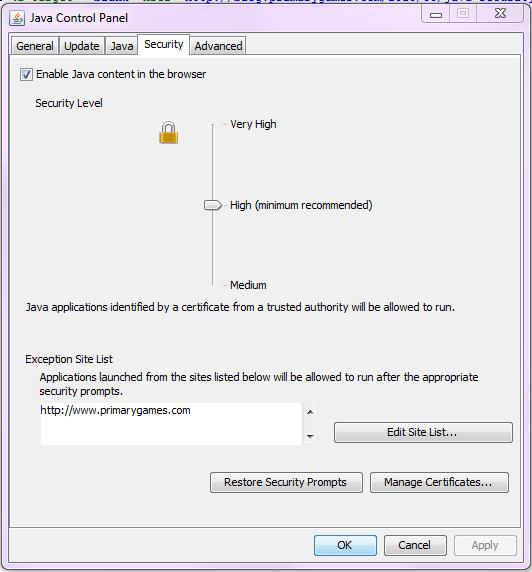
Find Java listed under Programs and click on "Configure Settings". Click on the Security Tab and then click on the Edit Site List button. You will need to add https://www.primarygames.com to the Exceptions Site List. Then click the OK button.
  

Now open your browser and navigate to one of our Java games. You may get a window like this:
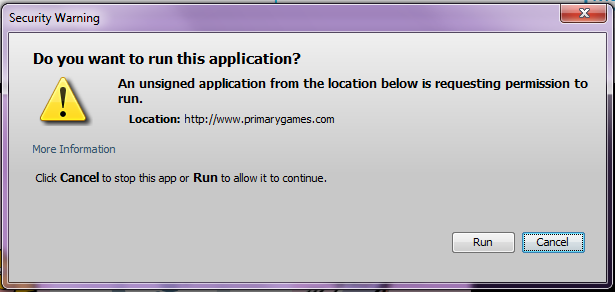


Click the Run button to continue. The games should now load like normal.

Tuesday, March 12, 2013

Java Security Warning Workaround

Due to security measures implemented in the latest version of Java (version 7 update 17) many PrimaryGames Java games may be asking you permission to run before they load.

With a few quick mouse clicks you should be able to bypass these messages and prevent them from appearing in the future.

When you see a window that looks like this when loading a PrimaryGames game:


Click on the “Do not show this again for this app” check-box on the bottom left and then hit the “Run” button. Once you’ve gone through the process with all PrimaryGames’s game types, you should not see the security warning window pop up again when you are on PrimaryGames.

Copyright © 2000-2010 PrimaryGames, Inc. All rights reserved.